Build skills that move careers forward
Learn AI, Microsoft technologies, workplace skills and the latest AI tools at your own pace, on your laptop or phone. Finish with certificates employers recognise. Whether you’re a student, starting out, changing careers or leading a team, there’s a path for you.
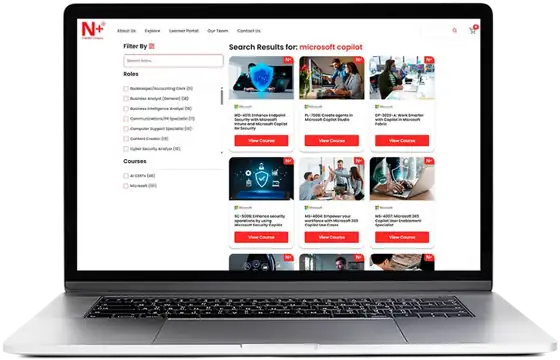
- 250+ coursesAligned to industry certifications
- AI CERTs + MicrosoftBuilt with two leading certification bodies
- Web + mobileLearn anywhere, even offline
- 12 monthsUnlimited access with one pass
Where do you want to start?
Pick what sounds most like you and we’ll suggest a few courses to begin with. You can take any course in the library with the pass.
Start with the basics, then try the tools
You don’t need a technical background. Begin with a plain-English introduction to AI, then get hands-on with the assistants people use every day.
- AI+ Everyone™8 hours
- ChatGPT4 hours
- Claude 10112 hours
- MS-4023: Get More Done with Copilot Chat8 hours
Prepare for an official Microsoft exam
Certification-aligned courses that follow Microsoft’s own exam objectives, with practice built in. Start with AI-901 if you’re new to Azure.
- AI-901: Introduction to AI in Azure8 hours
- AZ-104: Microsoft Azure Administrator32 hours
- PL-300: Analytics with Power BI24 hours
Build the skills a new role asks for
Follow a guided path towards roles like data analyst, cloud administrator or AI specialist, and finish with certificates you can show employers.
- AI+ Data™40 hours
- PL-300: Analytics with Power BI24 hours
- AI+ Agent™8 hours
Lead the change instead of reacting to it
Understand what AI means for your organisation, then sharpen the communication skills that bring a team with you.
- AI+ Executive™8 hours
- Emotional Intelligence for Workplace Success12 hours
- Storytelling for Influence12 hours
- Giving Great Feedback12 hours
Get ahead before university or your first job
Learn to use AI well for study, build confidence under pressure, and earn certificates that strengthen university and job applications.
- AI+ Everyone™8 hours
- AI-901: Introduction to AI in Azure8 hours
- Communicating Calmly Under Pressure12 hours
- ChatGPT4 hours
Upskill, reskill or onboard a whole team
Give everyone the same library, with guided tracks for each role. Admins can manage seats, track completion and pull reports from one dashboard.
- Upskilling current staff in AI and MicrosoftGuided tracks
- Reskilling people into new rolesRole paths
- Onboarding new hiresSelf-paced
What’s in the library
Four collections, all included in the All Access Pass. Open any course below to see what it covers.
AI CERTs® certifications
51 in the library, 5 shown here
Globally recognised AI certifications in three kinds of track: foundations for beginners, role-based tracks for specific jobs, and industry tracks for sectors like healthcare and construction.
AI+ Everyone™Beginner8 hours
The place to start if AI is new to you. No technical background needed: learn what AI can and can’t do, how to use generative AI tools well, and how to use them responsibly.
Good for: Anyone, at any age or stage, in any field.
What you’ll learn
- AI and the future of work
- Generative AI basics
- Prompting essentials
- AI for study and work productivity
- AI for decisions
- AI agents and automation
- Ethics, privacy and security
AI+ Executive™Leaders8 hours
A strategy-first certification for people who lead others. It focuses on business value, risk and change rather than technical detail.
Good for: Business owners, school leaders, managers and executives.
What you’ll learn
- Understanding AI
- AI technologies and what they mean for business
- Building an AI strategy
- Ethical, legal and social questions
- Managing AI projects
- Department-by-department uses of AI
AI+ Agent™Beginner8 hours
Design and launch AI agents that carry out tasks for you. Includes no-code tools, so you don’t need to be a programmer.
Good for: Anyone who wants to automate repetitive work, including non-coders.
What you’ll learn
- What AI agents are and how they work
- No-code tools for building agents
- Building simple and multi-tool agents
- Connecting agents to your apps
- Guardrails and responsible use
AI+ Data™Intermediate40 hours
A full grounding in data science and AI-driven analysis, from statistics and Python to using generative AI to find insights.
Good for: Future data analysts and data scientists, and STEM students heading to university.
What you’ll learn
- Foundations of data science and statistics
- Data sources and types
- Python for data science
- Cleaning and preparing data
- Exploratory data analysis
- Generative AI for insights
AI+ Healthcare Administrator Practitioner™Industry8 hours
How AI simplifies hospital and clinic administration, from scheduling and billing to claims and staff workflows.
Good for: Healthcare administrators, clinic managers and health-management students.
What you’ll learn
- AI basics for healthcare administration
- Data literacy
- Optimising operations
- Generative AI in admin work
- Billing, coding and claims
- Ethics, bias and regulation
Also in the library: AI+ Foundation™, AI+ Prompt Engineer™ (Levels 1 and 2), AI+ Developer™, AI+ Cloud™, AI+ Security™, AI+ Architect™, AI+ Ethics™, AI+ Writer™, AI+ Construction Practitioner™, AI+ Mining Practitioner™ and Bitcoin+ certifications.
Microsoft courses
122 in the library, 6 shown here
Role-based training across the Microsoft ecosystem, from a first look at AI on Azure to preparing for official certification exams.
AI-901: Introduction to AI in AzureBeginner8 hours
A first, hands-on step into AI on Microsoft Azure. You learn the ideas behind generative AI, AI agents, computer vision, speech and language, then build your first AI apps and agents in Azure AI Foundry.
Good for: Students and early-career learners who want a solid footing in AI and cloud.
Helpful to have: Basic computing knowledge and a little Python.
What you’ll learn
- Core AI concepts and responsible AI
- How large language models, prompts and agents work
- Language, speech and computer vision services
- Pulling information out of documents, audio and video
- Building generative AI apps and agents in Azure AI Foundry
Tools: Azure AI Foundry, Azure OpenAI Service, Azure AI Language, Document Intelligence
AZ-104: Microsoft Azure AdministratorIntermediate32 hours
Learn to run Azure the way a working cloud administrator does: identity, networking, storage, compute and governance across cloud and hybrid setups. Prepares you for the AZ-104 certification exam.
Good for: Aspiring cloud administrators and IT staff moving into Azure.
What you’ll learn
- Managing Azure with the Portal, Cloud Shell, Bash and PowerShell
- Deploying infrastructure with ARM templates
- Identity and access with Microsoft Entra ID
- Virtual networks, storage and compute
- Governance, monitoring and backup
Tools: Azure Portal, Azure Monitor, Azure PowerShell
PL-300: Analytics with Power BIIntermediate24 hours
Turn raw data into clear, interactive reports. You prepare data from different sources, build data models, design dashboards and share them securely. Prepares you for the Power BI Data Analyst Associate certification.
Good for: Anyone who works with spreadsheets and reports, and aspiring data analysts.
What you’ll learn
- Preparing data from different sources
- Building efficient data models
- Writing calculations with DAX
- Designing reports and dashboards
- End-to-end analytics with Microsoft Fabric
- Sharing reports and managing access
Tools: Power BI, Power Query, DAX, Microsoft Fabric
AI-200: Develop AI Cloud Solutions on AzureAdvanced40 hours
A developer-focused course on building production-ready AI applications with containers, serverless functions, vector search, caching and event-driven design.
Good for: Developers and engineers building AI products in the cloud.
What you’ll learn
- Containers with Azure Container Registry, AKS and Container Apps
- Vector search and caching for AI workloads
- Cosmos DB, PostgreSQL and Redis
- Event Grid, Service Bus and Azure Functions
- Securing and monitoring AI apps
Tools: Docker, Helm, Azure Kubernetes Service, OpenTelemetry
MS-4023: Get More Done with Copilot ChatBeginner8 hours
Use Microsoft 365 Copilot Chat as an everyday assistant: set it up, write prompts that get good results, and speed up writing, analysis, slides and teamwork.
Good for: Students, teachers and anyone who uses Microsoft 365 daily.
What you’ll learn
- Getting started with Copilot Chat
- Writing prompts that work
- Automating repetitive tasks
- Working with others using AI
- Using Copilot safely and responsibly
Tools: Copilot Chat, Word, Excel, PowerPoint, Teams
AB-6002: Introduction to Finance in Dynamics 365Beginner8 hours
A practical introduction to Dynamics 365 Finance, one of the most widely used business systems. See how core finance work runs inside it and how Copilot is changing it.
Good for: Accounting and business students, finance staff and future ERP specialists.
What you’ll learn
- ERP basics, navigation and reporting
- General ledger, cash and bank
- Payables and receivables
- Budgets, expenses and fixed assets
- AI forecasting and Copilot automation
Tools: Dynamics 365 Finance, Microsoft 365 Copilot, Power Platform
Also in the library: AI-102: Develop AI Solutions in Azure, SC-200: Security Operations Analyst, MS-4017: Manage and Extend Microsoft 365 Copilot, Introduction to Service in Dynamics 365, and courses on Microsoft 365, Teams, SharePoint and Power Platform.
Soft skills
33 in the library, 4 shown here
Practical, self-paced courses in the people skills that matter more as AI takes on routine work.
Emotional Intelligence for Workplace SuccessAll levels12 hours
Build the self-awareness, self-management, empathy and social skills behind strong performance and good relationships, through practical exercises like emotional mapping and trigger tracking.
What you’ll learn
- Why emotional intelligence matters at work
- Recognising emotional signals
- Staying calm and resilient
- Empathy and influence
- Building strong working relationships
Giving Great FeedbackAll levels12 hours
Practical ways to give and receive feedback that builds trust and helps people grow, including how to handle the difficult conversations.
What you’ll learn
- Shifting feedback from judging to growing
- Observing behaviour without judgement
- Framing feedback as a story
- Giving feedback in the moment
- Receiving feedback well
- Building a feedback culture
Storytelling for InfluenceAll levels12 hours
Learn why stories persuade better than facts alone, and how to use them in presentations, interviews, meetings and everyday leadership.
What you’ll learn
- Why stories move people
- Building stories that stick
- Emotional connection
- Storytelling as a daily habit
- Stories in voice, visuals and digital media
Communicating Calmly Under PressureAll levels12 hours
Stay clear and confident when the stakes are high: exams, interviews, presentations or tough conversations. Grounded in the science of stress.
What you’ll learn
- How stress affects how we speak
- Language for calm, confident communication
- Grounding techniques
- Handling conflict and criticism
- Communicating calmly online
- Long-term communication resilience
Also in the library: Leadership Essentials with Emotional Intelligence, Mastering Critical Thinking, Collaboration in the Modern Workplace, Cultural Intelligence for Global Business, The Art of Persuasion and Negotiation, and The Agile Leader.
AI tools
60 in the library, 4 shown here
Short, hands-on courses on the AI tools changing how people study and work.
ChatGPTAll levels4 hours
Get real value from ChatGPT, from your first prompts to advanced workflows with files, data analysis, browsing, voice, memory and custom GPTs.
What you’ll learn
- Prompting and controlling the output
- Editing and improving work with AI
- Advanced, reliable workflows
Claude 101All levels12 hours
Hands-on training in Anthropic’s Claude for everyday and complex work: strong prompting habits, Projects and Artifacts, connected tools and in-depth research.
What you’ll learn
- Getting started with Claude
- Organising work with Projects and Artifacts
- Extending Claude with Skills and tools
- Real-world, role-based workflows
MidjourneyAll levels4 hours
Create striking images and video from text prompts, from the basics to professional creative work.
What you’ll learn
- Marketing and advertising visuals
- Concept and design visualisation
- Storyboards and illustration
Zapier AIAll levels4 hours
Automate repetitive work by connecting thousands of apps with AI-powered workflows. No coding required.
What you’ll learn
- Lead management and data enrichment
- Automated customer support and chatbots
- AI content and marketing workflows
Also in the library: Microsoft 365 Copilot, Adobe Firefly, Runway, Grammarly, Copy AI, Otter AI, DeepL and Replit.
Learning paths by role
Curated sequences of courses
Not sure which courses fit together? Follow a path built around a specific job.
How learning on N+ works
- Check your level
A short skills check shows where you are and where to begin.
- Choose a path
Pick a learning path for your role, goals or the certification you want.
- Learn and practise
Bite-sized lessons, quizzes and hands-on labs, whenever it suits you.
- Get certified
Earn a certificate and share it on LinkedIn, your CV or applications.
Everything a course includes
For individuals and teams
The pass suits anyone who wants to learn. Organisations use the same library to build skills across a whole team.
Upskilling
Stay current as AI and technology change, without stepping away from work or study.
Reskilling
Build the knowledge to move into a new role, with guided tracks for the skills that role needs.
Onboarding
Help new starters get productive quickly with structured, self-paced training from day one.
Questions
Do I need any experience?
No. Courses like AI+ Everyone™, AI-901 and the AI tools courses are built for complete beginners. More advanced courses list what’s helpful to know first.
Are there fixed class times?
No. Every course is self-paced, so you learn whenever it suits you and pick up where you left off.
What does the All Access Pass include?
Unlimited access to the whole N+ library for 12 months: every AI CERTs®, Microsoft, soft skills and AI tools course, on web and on the N+ mobile app.
Can I learn on my phone?
Yes. Use the N+ app on iOS or Android, including offline downloads. Your progress syncs between devices.
How do I get access after I buy?
Buy the pass here, and the Pundit Academy team will send you the steps to set up your N+ account.
Can you help me choose courses?
Yes. Tell us your goals using the form below or on WhatsApp, and we’ll suggest a path.
Can I buy access for a team or school?
Yes. Get in touch and we’ll talk you through options for groups, including progress tracking for administrators.
Start learning today
Every course on this page, and hundreds more, with one pass.
A Smarter Way to LearnQuestions? Use the form below or chat with us on WhatsApp.